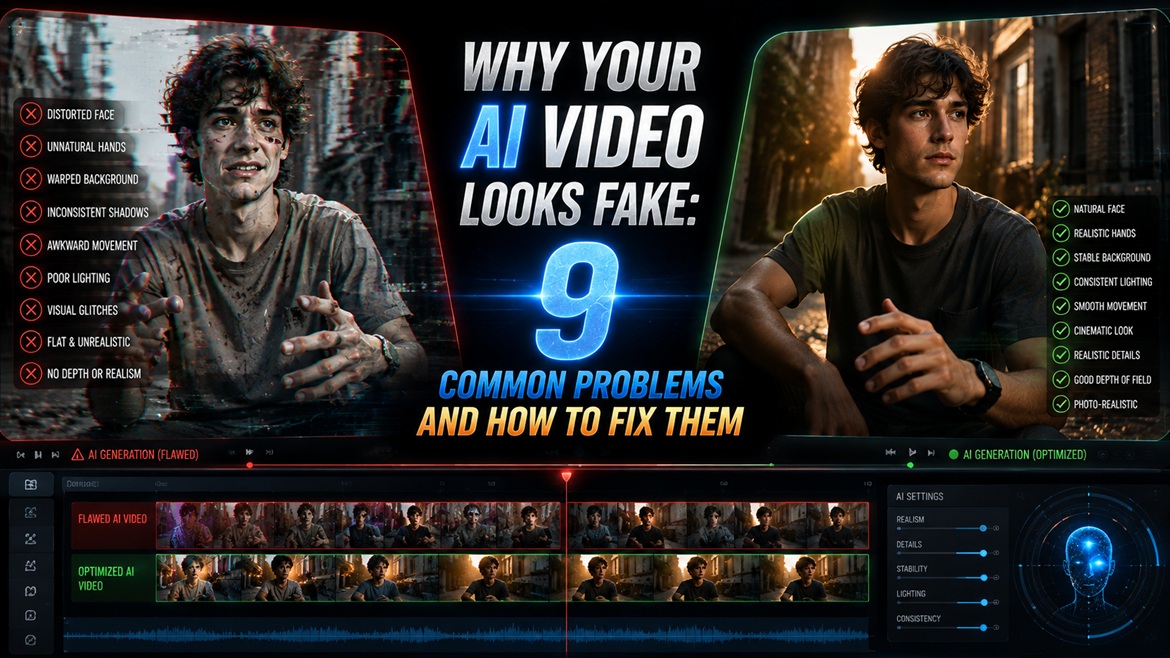
AI video generation ne content creation ko kaafi easy bana diya hai. Aaj aap sirf ek text prompt ya reference image ke through cinematic scenes, realistic characters, product videos, social media reels aur short films tak create kar sakte hain.
Lekin ek problem abhi bhi bahut common hai.
Video technically sahi hoti hai, lekin dekhne par fake lagti hai.
Kabhi character ki movement stiff hoti hai. Kabhi face frames ke beech change hone lagta hai. Hands strange appear karte hain. Background objects flicker karte hain. Kabhi shadows suddenly direction change kar leti hain, aur kabhi camera movement real footage jaisa feel nahi hota.
Agar aapke AI-generated videos mein bhi aise issues aa rahe hain, to zaroori nahi ki AI tool kharab ho.
Bahut baar problem prompt mein described motion, camera movement, lighting ya scene complexity ki hoti hai.
Is guide mein hum un common problems ko simple Hinglish mein samjhenge jo AI videos ko artificial bana deti hain. Saath hi, har problem ke saath practical fixes aur copy-paste prompt examples bhi dekhenge.
AI Videos Fake Kyu Lagti Hain?
Sabse pehle ek important baat samajhna zaroori hai.
AI video generator ko sirf ek beautiful frame create nahi karna hota. Usse multiple frames ke across character, environment, lighting, camera aur motion ko consistent rakhna hota hai.
Yahi wajah hai ki ek single AI-generated image realistic lag sakti hai, lekin usi image ko moving video mein convert karte waqt problems appear ho sakti hain.
For example, ek still image mein person’s hands perfect dikh sakte hain. Lekin jab wahi person video mein cup uthata hai, AI ko har frame mein hand, fingers, cup aur arm ki position logically maintain karni padti hai.
Agar motion complex hai, to model kabhi-kabhi details ko incorrectly reconstruct kar sakta hai.
Isi tarah crowded background, fast camera movement, multiple characters aur complicated lighting bhi consistency ko difficult bana sakte hain.
Isliye realistic AI video ke liye sirf “make it cinematic” likhna enough nahi hai.
Aapko AI ko clearly batana hota hai:
- Subject kya karega?
- Movement kitni fast hogi?
- Camera kaise move karega?
- Lighting kis direction se aayegi?
- Background mein kya change hoga?
- Scene kitne simple ya complex hona chahiye?
Ab ek-ek problem ko dekhte hain.
1. Aap Ek Short Clip Mein Bahut Zyada Motion Demand Kar Rahe Hain
Ye AI video mein fake-looking motion ka ek major reason hai.
Suppose aap 4-second ka video generate kar rahe hain aur prompt mein likhte hain:
A man stands up, walks toward the camera, turns around, picks up a phone, looks at it, smiles and waves.
Technically ye ek hi prompt hai, lekin AI ke liye ismein bahut saare actions hain.
4 seconds ke andar character ko stand, walk, turn, pick, look, smile aur wave karna hai. Itni saari movements ko limited duration mein smoothly render karna difficult ho sakta hai.
Result mein movement rushed, jerky ya unnatural feel ho sakti hai.
Better Approach
Ek short clip mein one primary movement describe karein.
Instead of:
A man stands up, walks forward, turns around and waves at the camera.
Try:
A man slowly turns toward the camera with a natural, relaxed movement. His posture remains stable and realistic throughout the shot.Is prompt mein AI ko ek clear movement milti hai.
Aap next clip mein walking ya waving separately generate kar sakte hain.
Pro Tip
Agar scene mein multiple actions hain, to unhe ek long video mein force karne ke bajaye multiple short clips mein divide karna often better approach hota hai.
Simple motion usually looks more natural than too many actions packed into a short generation.
2. Aapka Prompt Image Jaisa Hai, Video Jaisa Nahi
Ye beginners ki ek bahut common mistake hai.
Image prompt mein hum mostly appearance describe karte hain:
A stylish man wearing a black suit standing in a luxury hotel lobby, cinematic lighting, shallow depth of field.
Ye image ke liye useful hai.
Lekin video ke liye AI ko ye bhi pata hona chahiye ki scene mein movement kya hogi.
Agar prompt sirf appearance describe karta hai, to model khud decide karega ki character aur camera kaise move karein. Result kabhi-kabhi static, floaty ya artificial lag sakta hai.
Video Prompt Mein Ye 3 Things Add Karein
1. Subject movement
Character kya karega?
2. Camera movement
Camera static rahega ya move karega?
3. Timing or pacing
Movement slow hogi, natural hogi ya fast?
Better Video Prompt
A stylish man wearing a black suit slowly walks toward the camera with natural body movement. The camera gently tracks backward at the same pace. His posture remains stable and realistic throughout the shot. Soft cinematic lighting remains consistent from beginning to end.Ab AI ko sirf scene nahi, motion ka complete direction bhi mil raha hai.
Quick Rule for Better AI Video Prompts
Ek simple formula yaad rakhein:
Subject + Action + Camera Movement + Lighting + Environment + Pacing
For example:
A woman slowly walks through a modern hallway while looking ahead. The camera gently tracks backward at eye level. Soft window light remains consistent across the scene. Natural walking motion, realistic body movement, smooth cinematic pacing.Ye structure aap almost kisi bhi AI video concept ke liye adapt kar sakte hain.
3. Faces and Hands Are Doing Too Much
AI video mein face aur hands sabse difficult elements mein se ho sakte hain, especially jab unhe continuously move karna ho.
Ek still image mein face aur hands perfect dikh sakte hain. Lekin video mein AI ko har frame ke across eyes, lips, fingers, skin texture aur overall facial structure maintain karni hoti hai.
Agar aap prompt mein bahut detailed facial expressions ya complicated hand movements demand karte hain, to glitches appear ho sakte hain.
For example:
A woman talks rapidly while making complex hand gestures, counting on her fingers, touching her face and moving her hands toward the camera.
Is scene mein AI ko ek saath face, lips, fingers aur body movement track karna padega.
Result mein fingers merge ho sakti hain, hands distort ho sakte hain ya face frames ke beech subtly change ho sakta hai.
Better Approach
Movement ko simple rakhein.
A woman looks naturally toward the camera and gives a subtle smile. Her head moves slightly while her hands remain relaxed at her sides. Natural facial movement, realistic blinking and smooth body motion.Agar hands important hain, to unhe simple movement dein.
The man slowly raises one hand and gives a natural wave toward the camera. Fingers remain anatomically correct and consistent throughout the movement.Pro Tip
Agar realism priority hai, to subtle movement often better hoti hai than exaggerated movement.
4. Lighting Aur Shadows Frames Ke Beech Change Ho Rahe Hain
Aapka AI video technically smooth ho sakta hai, lekin agar lighting inconsistent hai to viewer ko instantly feel ho sakta hai ki video synthetic hai.
Imagine karein ki subject ke left side se sunlight aa rahi hai. First few frames mein shadow right side hai. Suddenly next frames mein shadow direction change ho jaati hai.
Real camera footage mein aisa normally nahi hota.
Isi tarah:
- Face highlights flicker karna
- Shadows suddenly disappear hona
- Reflections change hona
- Light intensity constantly fluctuate karna
video ko fake appearance de sakta hai.
Better Approach
Prompt mein ek clear light source aur direction mention karein.
Soft natural window light enters from the left side of the scene. Keep the lighting direction, shadow placement, brightness and reflections consistent throughout the entire shot.Outdoor scene ke liye:
Warm golden-hour sunlight comes from the upper left, creating soft consistent shadows on the subject. Maintain the same sunlight direction and intensity throughout the entire video.Avoid Overcomplicated Lighting
Agar aap ek hi scene mein likhen:
Neon blue light from the left, red light from the right, warm sunlight from behind, glowing lights above, cinematic reflections everywhere…
to AI ko multiple light sources maintain karne padenge.
Simple lighting setup usually zyada stable hota hai.
5. Clip Aapke Scene Ke Liye Bahut Long Hai
Longer video ka matlab automatically better video nahi hota.
AI model ko jitne zyada frames generate karne padenge, utne zyada opportunities hoti hain ki character, background, lighting ya object details gradually drift karein.
Example:
First few seconds:
Perfect face → correct clothes → realistic background
Later:
Face slightly changes → clothing texture shifts → background objects move unnaturally
Isse video ke beginning aur ending ke beech noticeable difference aa sakta hai.
Better Approach
Agar aap kisi new concept ko test kar rahe hain, pehle short clip generate karein.
Check karein:
- Motion smooth hai?
- Face consistent hai?
- Background stable hai?
- Lighting consistent hai?
- Camera movement natural hai?
Agar result good hai, tab longer sequence ya multiple clips ke through scene build karein.
Example
Instead of asking for:
A man walks across an entire city street for 15 seconds while talking, turning and interacting with people.
Start with:
A man slowly walks toward the camera on a quiet city street. The camera smoothly tracks backward. Natural walking motion, stable facial features, consistent lighting and realistic body movement.Pehle core movement test karein. Uske baad scene ko expand karein.
6. Aapne Camera Style Specify Nahi Kiya
AI-generated videos mein ek subtle problem hoti hai: camera movement unrealistic feel ho sakti hai.
Kabhi camera unnecessarily float karta hai. Kabhi subject ke around strange movement karta hai. Kabhi zoom aur tracking ek saath hone lagte hain.
Real cinematography mein camera movement usually intentional hoti hai.
Isliye prompt mein camera behavior clearly define karna useful hai.
Common Camera Styles
Static tripod
Static tripod camera with no camera movement. The subject moves naturally within the frame.Slow push-in
A slow cinematic dolly-in toward the subject with smooth, controlled camera movement.Tracking shot
The camera smoothly tracks alongside the subject at walking speed, maintaining consistent framing.Handheld documentary
Natural handheld documentary-style camera with subtle realistic movement and slight organic camera shake.Pro Tip
Agar aap beginner hain, static camera ya slow dolly-in se start karein. Ye complex camera movements ke comparison mein easier to control hote hain.
7. Background Elements Inconsistent Ho Rahe Hain
AI video mein subject ke saath background ko consistent rakhna bhi ek challenge ho sakta hai. Ye problem especially crowded streets, forests, beaches, water, moving cars aur detailed environments mein zyada noticeable hoti hai.
For example, ek outdoor scene mein trees ke leaves suddenly change ho sakte hain, background mein people distort ho sakte hain, ya water ka movement unnatural lag sakta hai.
Aise small inconsistencies video ko synthetic feel de sakte hain, even when the main subject looks realistic.
Better Approach
Agar subject realism sabse important hai, to background ko thoda simple rakhein.
A man walks slowly through a quiet modern street. Keep the background simple and stable, with minimal moving objects. Use a shallow depth of field so the background remains softly blurred throughout the shot.
Shallow depth of field ka use bhi helpful ho sakta hai. Isse background naturally soft ho jata hai aur unnecessary background details ko AI ko maintain nahi karna padta.
Pro Tip
Agar aapko complex background chahiye, to pehle subject aur movement ko stable banayein. Uske baad more detailed environments ke saath experiment karein.
8. Aap Sirf Ek Generation Ko Judge Kar Rahe Hain
Ye mistake image generation ki tarah video generation mein bhi hoti hai.
Kabhi ek prompt se first attempt mein video mein glitches aa jaate hain. User assume kar leta hai ki prompt hi kharab hai aur usse completely rewrite kar deta hai.
Lekin AI generation mein randomness ki wajah se same prompt ka next attempt noticeably better ho sakta hai.
For example, first generation mein:
- Face flicker kar sakta hai.
- Walking unnatural ho sakti hai.
- Background distort ho sakta hai.
Lekin second ya third attempt mein wahi concept much cleaner aa sakta hai.
Better Approach
Ek prompt ko judge karne se pehle 2–3 generations test karein.
Agar har attempt mein same type ka problem aa raha hai, tab prompt simplify karein.
For example:
Attempt 1: Complex walking + camera rotation + crowd
Attempt 2: Simple walking + tracking camera
Attempt 3: Simple walking + static camera
Is testing process se aap easily identify kar sakte hain ki problem prompt mein hai, motion mein hai ya tool ki limitation mein.
9. Ho Sakta Hai Problem Aapke Prompt Ki Nahi, Tool Ki Ho
Ye point important hai.
Har AI video generator ki apni strengths aur limitations hoti hain. Ek tool realistic talking portraits mein achha perform kar sakta hai, jabki doosra cinematic camera movement ya product shots mein better result de sakta hai.
Agar aap ek specific type ka shot repeatedly generate kar rahe hain aur har attempt mein similar glitches aa rahe hain, to ho sakta hai ki tool us particular type of motion ko abhi consistently handle nahi kar pa raha ho.
For example, difficult scenarios include:
- Very fast action
- Large crowds
- Complex hand interactions
- Multiple characters moving simultaneously
- Extreme camera movements
- Highly detailed environments
Aise cases mein prompt ko endlessly rewrite karne ke bajaye concept ko simplify karke test karein.
Simple Testing Method
Same concept ko teen levels par test karein:
Level 1 — Simple
A woman slowly walks toward the camera on a quiet street. Static camera, natural movement, consistent lighting.
Level 2 — Moderate
A woman slowly walks toward the camera while the camera gently tracks backward. Natural body movement, soft daylight, stable background.
Level 3 — Complex
A woman walks quickly through a busy city street while the camera circles around her as pedestrians move in different directions and cars pass behind her.
Agar Level 1 aur Level 2 realistic hain but Level 3 repeatedly fails hota hai, to likely issue scene complexity hai, na ki basic prompt quality.
Quick Diagnostic Checklist
AI video generate karne ke baad agar output fake lag raha hai, to ye checklist quickly run karein:
- Kya clip mein bahut saare actions hain?
- Kya subject ka movement clearly describe kiya hai?
- Kya camera movement specify ki hai?
- Kya face aur hands ko unnecessary complex movement diya hai?
- Kya lighting direction consistent hai?
- Kya clip concept ke comparison mein bahut long hai?
- Kya background unnecessarily detailed hai?
- Kya shallow depth of field use kar sakte hain?
- Kya aapne same prompt ko multiple times test kiya?
- Kya problem har generation mein repeat ho rahi hai?
- Kya simpler version of the same scene better result deta hai?
Agar multiple boxes tick ho rahe hain, to prompt ko simplify karna usually best starting point hota hai.
Master Prompt for More Realistic AI Videos
Agar aapko ek simple starting template chahiye, to neeche diya gaya prompt apne concept ke according customize kar sakte hain.
Create a realistic cinematic video of [SUBJECT] performing [ONE SIMPLE ACTION]. Use natural, physically realistic movement with consistent body proportions and facial features throughout the entire shot. The camera uses [CAMERA MOVEMENT] with smooth, controlled motion and stable framing. Use [LIGHTING TYPE] coming from a consistent direction. Keep the background [SIMPLE/SLIGHTLY BLURRED] with minimal unnecessary movement. Maintain realistic shadows, reflections, textures, and natural motion throughout the video. Avoid exaggerated movement, sudden camera changes, object distortion, facial warping, flickering details, and unnatural motion.
Example
Create a realistic cinematic video of a stylish man slowly walking toward the camera on a quiet luxury hotel terrace. Use natural, physically realistic walking movement with consistent body proportions and facial features throughout the entire shot. The camera gently tracks backward with smooth, controlled motion and stable framing. Use soft golden-hour sunlight coming from the left side. Keep the background slightly blurred with minimal unnecessary movement. Maintain realistic shadows, reflections, fabric textures, and natural motion throughout the video. Avoid exaggerated movement, sudden camera changes, facial warping, flickering details, and unnatural motion.
Ye type ka prompt AI ko scene + movement + camera + lighting + consistency sab clearly communicate karta hai.
Final Thoughts
AI video ko realistic banana sirf high resolution ya cinematic keywords add karne ka game nahi hai. Sabse important cheez hai ki aap AI se kitna motion aur complexity demand kar rahe hain.Agar ek short clip mein bahut saare actions, multiple characters, complicated camera movements aur detailed background combine kar denge, to glitches ke chances naturally increase ho sakte hain.Better approach simple hai: ek clear action choose karein, camera movement define karein, lighting consistent rakhein aur unnecessary complexity remove karein.
Agar first generation perfect nahi hai, to immediately prompt ko completely rewrite na karein. Same concept ko 2–3 times test karein. Agar problem repeatedly aa rahi hai, tab scene ko simplify karke dobara generate karein.Aur sabse important, har AI video ko real-world cinematography ki tarah sochiye. Camera kaise move karega? Subject kya karega? Light kahan se aa rahi hai? Background mein kya actually move hona chahiye?
Jitna clear aap ye details define karenge, utna hi controlled aur natural output milne ka chance badhega.Realistic AI video ka simple rule: less unnecessary motion, better consistency, clearer prompts.