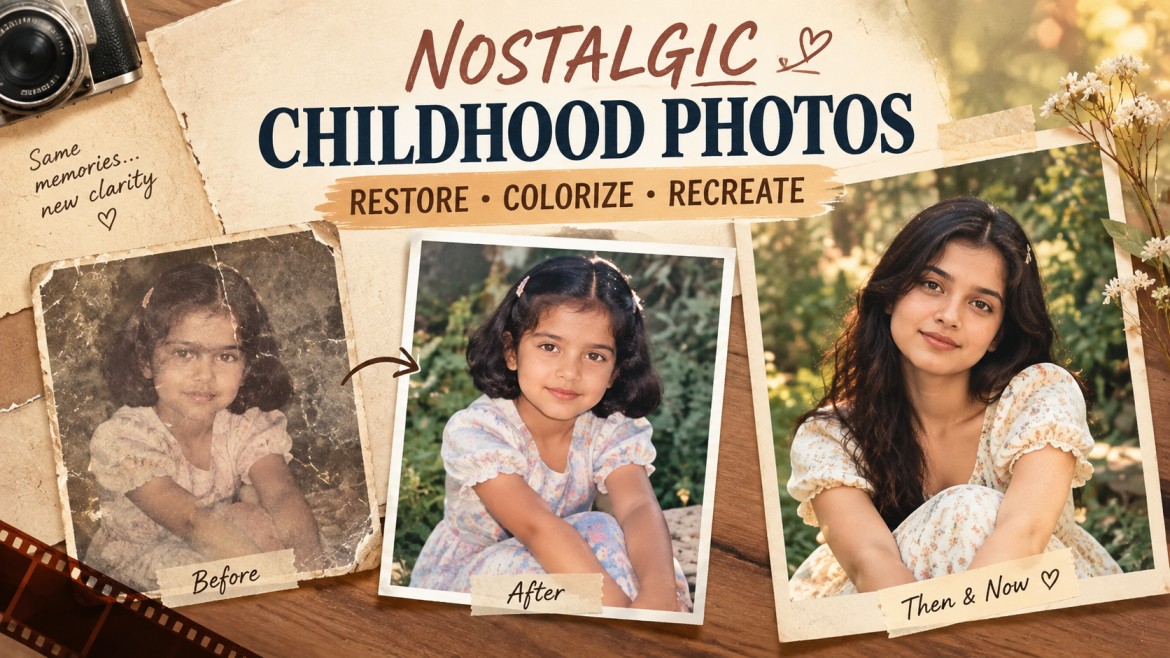
Old childhood photographs are more than pictures—they preserve moments that can never be photographed again. But over time, printed photos can become faded, scratched, stained, blurry, or damaged.
With modern AI image tools, you can restore many of these photographs while keeping the original person, composition, clothing, and background recognizable.
In this guide, you’ll find 2 detailed AI prompts for restoring childhood photographs, including a general restoration prompt and a prompt specifically designed for heavily damaged images.
What Can AI Restore in an Old Childhood Photograph?
AI restoration can help improve several common problems found in old photographs:
- Scratches and dust
- Faded colors
- Stains and discoloration
- Creases and folds
- Film deterioration
- Low contrast
- Minor blur
- Missing photographic details
- Black-and-white photos requiring colorization
- Damaged corners and sections
However, restoration works best when the AI is instructed to preserve the original photograph instead of creatively redesigning it.
That distinction is important when restoring childhood photographs because facial features and other personal details should remain as close to the original as possible.
Prompt 1: Restore and Colorize an Old Childhood Photograph
This prompt is suitable when the photograph is still mostly intact but has become faded, scratched, blurry, or discolored.
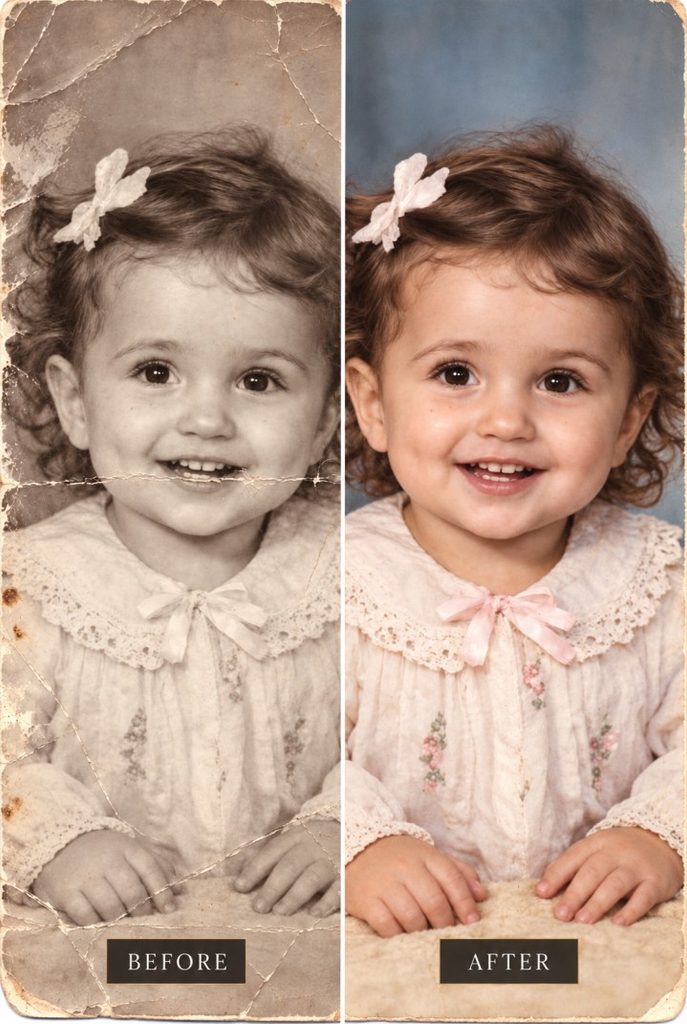
AI Prompt
When Should You Use This Prompt?
Use this prompt when your childhood photograph is old but still reasonably complete.
It is particularly useful for:
- Faded photographs
- Old black-and-white pictures
- Slightly blurry images
- Scratched photographs
- Discolored prints
- Photos with dust and film noise
- Photographs that need gentle color restoration
The important instruction is to preserve the original composition and identity while allowing AI to repair deterioration.
Prompt 2: Repair a Severely Damaged Childhood Photograph
Some childhood photographs have much more serious damage. They may contain large scratches, tears, stains, missing corners, or areas where photographic information has disappeared.
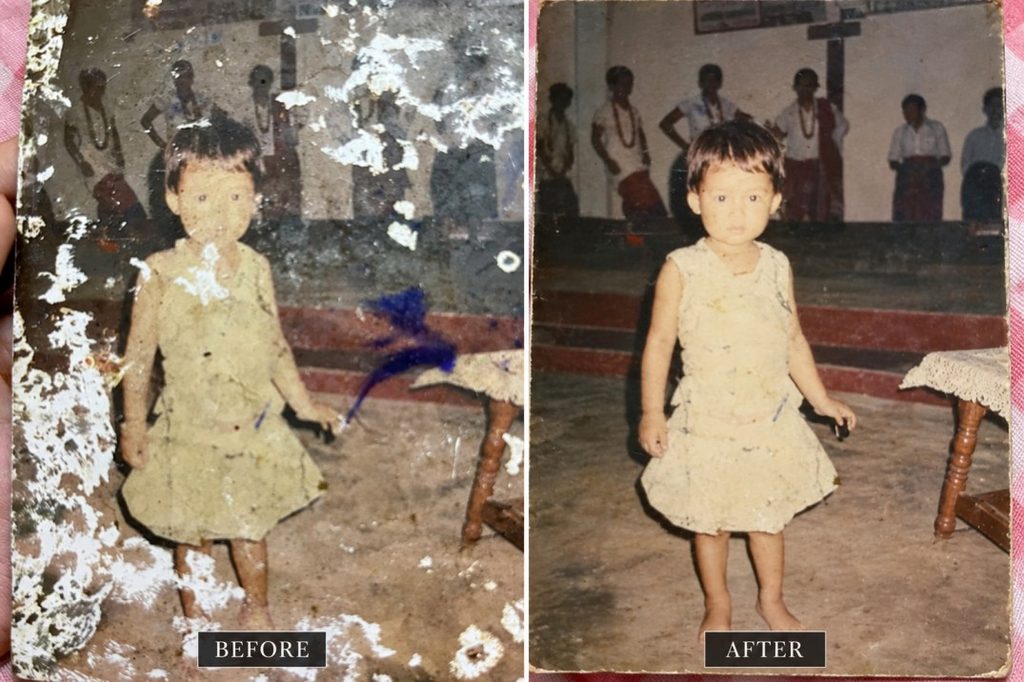
For these images, the AI should be instructed to reconstruct only what is necessary.
AI Prompt
When Should You Use This Prompt?
Use this version when the photograph has significant physical damage.
For example, it can be useful when the image contains:
- Large scratches
- Torn sections
- Heavy creases
- Water or stain damage
- Missing corners
- Strong film deterioration
- Damaged areas around faces or clothing
The prompt deliberately tells the AI to reconstruct the minimum necessary information rather than redesigning the photograph.
How to Get Better AI Restoration Results
1. Upload the Highest-Quality Original
Start with the best version of the photograph available.
If you have the original physical print, scanning it at high resolution is generally preferable to taking a screenshot or photographing a low-quality copy.
2. Don’t Ask AI to “Beautify” the Person
Words such as perfect face, beautiful skin, handsome, or glowing skin can encourage the model to modify facial characteristics.
For restoration, the objective should be preservation rather than beautification.
3. Tell the AI What Not to Change
Explicitly mentioning facial features, clothing, background, objects, and composition helps communicate that the photograph should be restored rather than creatively reinterpreted.
4. Use the Original Composition
Avoid unnecessary instructions that ask the AI to change the camera angle, crop, background, or pose.
A restoration should still feel like the same photograph.
5. Be Careful With Colorization
For black-and-white childhood photographs, colorization can produce attractive results, but colors may not be historically accurate.
Use instructions such as “subtle realistic color” and “historically believable colors” rather than demanding an extremely vibrant modern look.
6. Restore in Stages When Necessary
If a photograph is extremely damaged, trying to fix everything in a single generation can sometimes produce unwanted changes.
A practical workflow is:
Original Photo → Damage Restoration → Detail Enhancement → Optional Colorization
This gives you more control over the final result.
AI Restoration vs. Recreating a Childhood Photograph
There is an important difference between restoring and recreating a childhood photograph.
Restoration works with the original photograph and attempts to repair damage while preserving its existing content.
Recreation uses an old photograph as inspiration and generates a new image based on its composition, environment, or visual idea.
If your goal is to preserve an actual childhood memory, restoration is usually the appropriate approach.
If you want to recreate that memory with a present-day adult version of yourself, that is a different type of AI image prompt.
Why AI Sometimes Changes Faces During Restoration
One of the biggest problems with AI photo restoration is that severely damaged facial areas may contain too little information for the model to recover accurately.
When this happens, an AI model may generate plausible-looking facial details instead of truly recovering the original ones.
That’s why these prompts repeatedly emphasize:
- Preserve facial identity
- Preserve facial structure
- Don’t redesign facial features
- Don’t beautify faces
- Don’t change expressions
- Reconstruct only missing information
For heavily damaged photographs, you should also compare the restored result against the original before accepting it.
Frequently Asked Questions
Can AI restore old childhood photographs?
Yes. AI image tools can help repair common problems such as scratches, fading, stains, noise, discoloration, and some forms of damage. Results depend heavily on the quality and condition of the original photograph.
Can AI color
Yes. AI can add realistic-looking color to black-and-white photographs. However, the exact historical colors may not always be known, so colorization should be treated as an approximation unless the original colors are documented.
Can AI restore a damaged face in an old photograph?
AI can attempt to reconstruct damaged facial areas, but heavily damaged faces are challenging because the original information may no longer be present. The result should therefore be compared carefully with the source photograph.
How do I stop AI from changing the person’s face?
Tell the AI to preserve the person’s facial identity and structure and explicitly instruct it not to beautify, reshape, smooth, or redesign facial features. Also avoid prompts that ask for a more attractive or modern appearance.
Should I restore the photo or recreate it?
If you want to preserve the actual childhood photograph, use a restoration prompt. If you want a new image inspired by the childhood photograph, use a recreation prompt.
Final Thoughts
Restoring an old childhood photograph is less about creating a perfect new image and more about protecting the details that make the original memory recognizable.
For relatively intact photographs, use the first restoration prompt. For photographs with serious physical damage, the second prompt provides stricter instructions for repairing damaged areas while minimizing unnecessary changes.
The best results usually come from starting with the highest-quality original image and telling the AI exactly what should be preserved – not simply asking it to “make the old photo look better.”
Restore the photograph. Preserve the memory.